How to Sign a PDF Online for Free
To sign a PDF online for free, open it in a free tool that lets you add a signature, place your signature where it belongs, then export or download the signed file. On a Mac you can use Preview. On any device you can use Adobe Acrobat's free Fill & Sign, or a free web signer. Each works for simple documents.
The quick way
If you just need your own signature on a document and nothing more, here is the fastest path:
- Open the PDF in a tool that supports signing (Preview on macOS, Adobe Acrobat online, or a web signer).
- Choose the signature option, then draw, type, or upload your signature.
- Drag the signature to the right spot and resize it.
- Add the date or any initials if the document asks for them.
- Save or download the signed PDF, and keep the original somewhere safe.
That is enough for a form you are signing yourself. It gets harder when someone else needs to sign, or when you need proof of who signed and when.
The free method
There are a few genuinely free ways to sign a PDF.
macOS Preview. Open the PDF, click the markup icon, then the signature tool. You can create a signature with your trackpad or camera and drop it onto the page. No upload, no account. Good for signing your own documents on a Mac.
Adobe Acrobat Fill & Sign. Adobe offers a free online Fill & Sign tool. You upload the PDF, add your signature, and download it. It handles basic self-signing well.
Free web signers. Plenty of sites let you upload a PDF and sign it in the browser at no cost. They are quick, but read the fine print before you use one for work.
Here is the caveat. Most free tools give you a signed-looking PDF and nothing else. There is no audit trail - no record of who opened the document, what IP they signed from, or when each step happened. If a signature is ever questioned, a flat PDF is hard to defend.
The bigger risk is confidentiality. When you upload a client document to a random free site, you are handing a third party a copy of that file. You often do not know where it is stored, how long it is kept, or who can see it. For a lawyer, that is a problem before you even think about the signature.
The better way: do it in Surface
Surface is a desktop app for macOS and Windows built for legal work, and e-signature is built in.
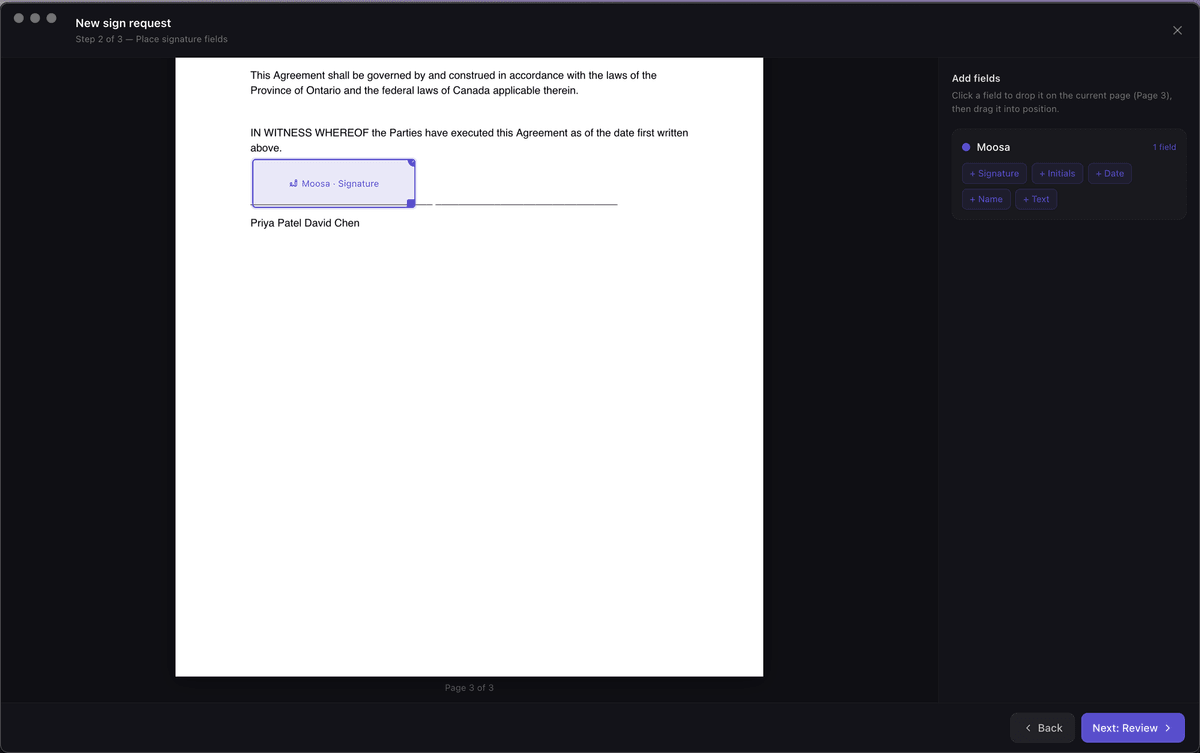
You place the fields yourself. Open the document in Surface and drag signature, date, and text fields exactly where they belong. Then you send it for signature.
The person signing gets a link. They sign on the web at getsurface.ca/sign, with no account and nothing to install. They fill the fields you placed and submit.
[//]: # (SCREENSHOT: Surface e-signature - the SignFieldEditor view placing a signature field on a retainer PDF (drag-placed signature/date fields visible). Recommended size 1200px wide.)
When everyone has signed, you get two things back: a signed PDF, and a Certificate of Completion. The certificate carries a full audit trail - each signer, their IP address, and timestamps for every step. That is the record a free tool does not give you.
Need more than one signer? Surface supports sequential signing, so the document moves from one person to the next in the order you set. A client signs, then a co-signer, then you.
Because it is a desktop app, your files stay under your control. Data is hosted on Canadian servers in AWS Montreal (ca-central-1), and a DPA is available on request. You are not scattering client documents across free websites to get a signature.
Surface is $99/month CAD flat, with everything included. There is a 14-day free trial, no credit card required, and you can cancel anytime.
Why this matters for lawyers
Signing is routine until it is contested. Then the details decide the outcome.
Retainers and engagement letters. These set the terms of the relationship. A signed PDF with a Certificate of Completion gives you a clean, dated record of what the client agreed to and when.
Remote client signatures. Clients rarely come to the office to sign. Sending a link they can open on a phone, with no account to create, removes the friction that stalls a file.
The audit trail as evidence. If a signature is ever challenged, the audit log - signer IP, timestamps, the order of events - is what backs it up. A flat PDF from a free tool has none of that.
Confidentiality. Keeping client documents inside a tool you control, rather than uploading them to free sites, is the safer default. It maps to your confidentiality duty under LSO Rule 3.3-1.
Canadian hosting. Client data on Canadian servers in AWS Montreal, with a DPA available on request, is easier to explain to a client and easier to square with your obligations than an offshore free service. You can read more on our compliance page.
On validity: electronic signatures are recognized in Canada under PIPEDA federally and, in Ontario, under the Electronic Commerce Act, 2000, for most documents. Some documents are excepted - wills and certain other instruments have special rules - so check the requirements for the specific document before you rely on an e-signature. This is general information, not legal advice.
FAQ
Is signing a PDF online legally valid in Canada?
For most documents, yes. Electronic signatures are recognized under PIPEDA federally and under Ontario's Electronic Commerce Act, 2000. Some documents, such as wills, have exceptions or extra requirements, so confirm the rules for your specific document. This is general information, not legal advice.
How do I sign a PDF for free?
Use a free tool: Preview on macOS, Adobe Acrobat's free Fill & Sign, or a free web signer. Open the PDF, add your signature, place it, and download the result. This works for signing your own documents, but free tools usually do not produce an audit trail.
Do e-signatures need an audit trail?
Not to be valid, but an audit trail makes a signature far easier to defend if it is ever questioned. A record of who signed, from what IP, and when - like Surface's Certificate of Completion - is stronger evidence than a flat signed PDF.
Can a client sign without an account?
Yes. With Surface, you place the fields in the app, then send a link. The client signs on the web at getsurface.ca/sign with no account and nothing to install.
What if I need more than one signer?
Surface supports multiple signers in a sequential order you set. The document moves from one person to the next, and everyone's actions are captured in the same audit trail.
Get Surface
If you sign documents for clients, do it in a tool built for it. Surface gives you drag-placed fields, web signing with no account for the client, a signed PDF, and a Certificate of Completion with a full audit trail - all on Canadian servers.
If you are weighing options, see our free DocuSign alternative for Canada and, if intake is part of your workflow, our guide to client intake software for solo lawyers.
It is $99/month CAD flat, everything included, with a 14-day free trial and no credit card. Download Surface and start the trial in-app.
Related posts
The Best DocuSign Alternative for Canadian Lawyers (2026)
The best DocuSign alternative for Canadian lawyers in 2026: Canadian data residency, a full audit trail, and a flat price - compared to DocuSign's US hosting.
Read →Client Intake Software for Solo Lawyers: A Complete Guide
A complete guide to client intake software for solo lawyers - what to collect, how to automate intake, and how to gather answers, files, and a signature in one flow.
Read →