Client Intake Software for Solo Lawyers: A Complete Guide
Client intake software helps a solo lawyer collect a new client's information, documents, and signature in one place, then move it straight into the matter. Instead of chasing forms over email, you send one link. The client fills it out, uploads files, and signs, and the responses come back to you organized.
The quick way
If you want the fastest reliable intake process, do this:
- Build one reusable intake form template with the questions you ask every new client.
- Send the client a single branded link to that form.
- Let the client answer the questions, upload their documents, and sign - all in the same flow.
- Attach any document you need signed as part of the same intake, so you are not sending a separate e-sign request later.
- Receive the completed responses back into the matter, ready to review.
The goal is one link, one flow, no re-typing. Everything the client sends lands in the right place instead of scattered across your inbox.
The free / manual method
You can run intake without any dedicated software. Plenty of solos do. Here is what that usually looks like:
You email the new client a welcome note. You attach a PDF intake form and ask them to print it, fill it in, scan it, and email it back. You send a separate list of documents you need - ID, a retainer, prior correspondence - and wait for those to trickle in as attachments. When you need a signature, you send yet another email, maybe through a separate e-signature tool, maybe as a "please print, sign, and scan" request.
It works, but it is slow and it leaks.
It is slow because every step is a round trip. The client forgets an attachment. You email again. They send a blurry scan. You email again. A three-day intake stretches into two weeks.
It is error-prone because information gets re-keyed. You copy answers off a PDF into your own notes. You mis-type a date of birth or a corporate number. Nobody notices until it matters.
And it scatters client PII across tools. Their identity documents sit in your inbox. Their answers sit in a downloaded PDF on your desktop. The signed retainer sits in a third app. That is more places to secure, more places to lose track of, and more places a mistake can happen. For a solo without an IT department, that sprawl is a real risk, not a hypothetical one.
The better way: do it in Surface
Surface runs the whole intake as one flow.
You send the client a branded intake form as a link. The form is built on Google Forms and branded through the form and the email, so it looks like it comes from your practice, not from a generic tool. You keep reusable intake form templates, so you are not rebuilding the same questions for every new client.
The client opens the link and does everything in one place. They answer your questions. They upload the files and documents you asked for. They add an optional e-signature. If there is a document that needs signing as part of onboarding, you attach it to the same intake, so the client signs it right there instead of in a separate request.
When they finish, the responses come back into the matter. The answers, the uploaded files, and the signature arrive together, tied to the right client, instead of landing as loose email attachments you have to sort by hand.
[//]: # (SCREENSHOT: Surface client intake - the NewIntakeModal / Intakes view showing a branded intake form being sent to a client (form + document-to-sign + review/send step). Recommended size 1200px wide.)
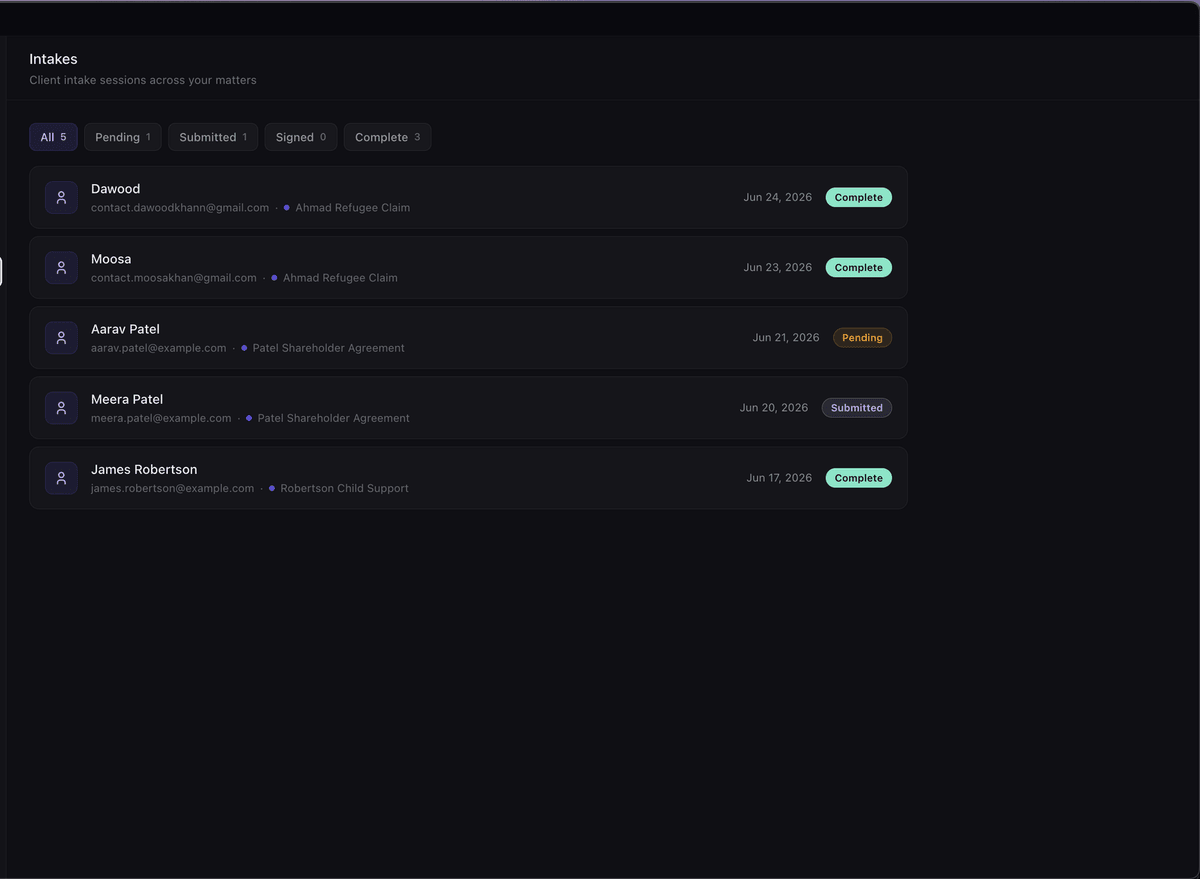
If you also need signatures outside of intake - a settlement document, a consent, a second party - Surface handles multi-signer e-signature with a Certificate of Completion and an audit log. You can read more about signing in our guide on how to sign a PDF online for free. And if you are weighing your whole software stack, see our rundown of legal practice management software for 2026.
Surface is a desktop app for macOS and Windows. It is $99/month CAD flat, with everything included, and there is a 14-day free trial with no credit card. You can compare it on the pricing page.
Why this matters for lawyers
Intake is not just an administrative step. It is where two of your professional obligations start.
The first is client identification and verification. The Law Society requires you to identify and, in many cases, verify who your client is. Intake is the natural place to collect that information and the documents that back it up. Doing it in a structured form, with the ID uploaded alongside the answers, makes it far easier to show you actually did it.
The second is conflict checks. You cannot run a conflict check on information you have not collected yet. Getting names of parties and adverse parties at intake, in a consistent format every time, means you can run that check before you commit to the matter.
Then there is confidentiality. Intake data is some of the most sensitive information you hold - identity documents, financial details, the nature of the client's problem. Under LSO Rule 3.3-1, you owe that information a duty of confidentiality. That is a strong reason not to leave it spread across your inbox and your desktop. Surface stores your data on Canadian servers, in AWS Montreal (ca-central-1), under a DPA available on request, and your data is never used to train AI. Handling intake in one place, on Canadian infrastructure, is easier to defend than a pile of email attachments.
Competence matters here too. LSO Rule 3.1-2 expects you to use processes that are reliable and current. A structured intake that does not drop attachments or re-key data by hand is part of that.
This is general information, not legal advice. Confirm your own obligations with the Law Society of Ontario and apply your professional judgment to your practice.
FAQ
What is client intake software?
Client intake software is a tool that collects a new client's information, documents, and signature and organizes it into a matter. Instead of trading emails and attachments, you send one form and receive structured responses back. It saves time and cuts down on re-typing and lost files.
What should a legal intake form include?
At a minimum: the client's full legal name and contact details, the names of any other parties (so you can run a conflict check), the nature of the matter, and any identity or supporting documents you need to collect. Many solos also attach a retainer or engagement document to sign during intake. Reusable templates keep this consistent across clients.
Can I collect a signature during intake?
Yes. In Surface, the intake flow includes an optional e-signature, and you can attach a document that needs signing as part of the same intake. The client answers your questions, uploads files, and signs in one flow, so you do not have to send a separate signing request afterward.
Is client intake data confidential?
It should be treated as confidential. Intake data often includes identity documents and sensitive facts, and you owe it a duty of confidentiality under LSO Rule 3.3-1. Keeping it in one place, on Canadian servers under a DPA available on request rather than scattered across inbox attachments, makes that duty easier to meet.
Do I need dedicated software, or can I just use email?
You can run intake over email and a PDF form. It works for a while. The trouble is that it is slow, it re-keys data by hand, and it spreads client information across several tools. Dedicated intake software is worth it once you are onboarding clients regularly and want one reliable process.
Get Surface
If you want intake that collects answers, files, and a signature in one branded flow - straight into the matter - try Surface. It is a desktop app for macOS and Windows, $99/month CAD flat with everything included, and a 14-day free trial with no credit card required. Cancel anytime.
Download Surface and set up your first intake form today.
Related posts
Best Legal Practice Management Software for Solo Lawyers (2026)
An honest 2026 roundup of legal practice management software for solo lawyers - Clio, MyCase, PracticePanther, CosmoLex, and Surface - compared on price and hosting.
Read →How to Sign a PDF Online for Free
How to sign a PDF online for free, whether e-signatures are legally valid in Canada, and how lawyers get a signed PDF with a full audit trail.
Read →