AI for Lawyers in Canada: The 2026 Guide to Working Faster and Staying Compliant
Canadian lawyers can use AI safely by pointing it at the right tasks, choosing tools hosted in Canada, and verifying every output against a source before it leaves your desk. Used that way, AI saves real hours on document-heavy work. Used carelessly, it puts confidentiality and your competence duty at risk.
What AI can (and can't) do for a Canadian legal practice
The useful thing to understand first is that AI is good at working with text you already have, and bad at knowing things you have not given it.
Where it genuinely helps:
- Summarizing your own documents, so you can get the gist of a 60-page agreement or a long email thread in a minute.
- Finding a specific clause or fact across a matter without opening every file by hand.
- Drafting first-pass correspondence you then edit, like a routine client update or a covering letter.
- Organizing a matter, such as pulling key dates and deadlines out of scattered files into one place.
Where it falls short, and where lawyers get into trouble:
- It is not a substitute for legal research. A general AI tool does not have reliable access to case law, and when it does not know an answer it can invent one.
- It is not a substitute for your judgment. It does not know your client's goals, the strategy, or what a court will actually accept.
- It hallucinates. AI can produce a confident answer, a citation, or a quote that is simply wrong. This is not a rare edge case, and it is the single biggest reason to verify everything.
The rule of thumb: use AI to work faster on material you can check, not to learn things you cannot verify.
The quick way to start
If you are a solo or small firm and want to start this week, keep it simple.
- Pick one repetitive, document-heavy task you do often, like summarizing intake documents or finding facts in a file.
- Choose a tool built for legal work and hosted in Canada, not a free consumer chatbot that trains on your inputs.
- Run it on a real but low-stakes matter first, so you can compare its output against what you already know.
- Verify every output against the source document before you rely on it. Read the paragraph it points to.
- Write a short internal note on what you will and will not use AI for, so your practice is consistent.
Starting small lets you build trust in the tool before it touches anything important.
Doing it compliantly: the rules that matter
In Ontario, two Law Society of Ontario rules frame most of this.
Rule 3.3-1 is your duty of confidentiality. That means client information should not be fed into a tool that stores it outside your control, uses it to train a model, or hosts it in a jurisdiction where a foreign government can compel access.
Rule 3.1-2 is your duty of competence. The commentary has been read to include understanding the technology you use and its limits, which means you are responsible for knowing that AI can be wrong and for verifying its output.
Two practical points follow from those duties.
Hosting matters. A tool hosted in the United States can be subject to the US CLOUD Act, which lets US authorities compel access to data held by US providers. For client confidentiality, Canadian hosting is the safer default, and you should confirm where a vendor actually stores your data rather than assume.
Training matters. If a tool trains its models on what you upload, your client's information becomes part of a system you do not control. Look for a clear commitment that your data is never used for training, backed by a data processing agreement.
You can read more about how this maps to specific rules and standards on our compliance page. This is general information, not legal advice - consult the LSO.
The better way: do it in Surface
Most of the risk above comes from generic tools that answer from the open internet and store your data wherever is cheapest. Surface takes the opposite approach: it is an AI assistant that works over your own files and email, and shows you exactly where every answer came from.
You ask a question in plain language, and Surface answers from your documents with exact-paragraph citations. A source panel opens beside the answer so you can click a citation and read the exact source paragraph it relied on. That turns verification from a chore into a click, which is the whole point when your competence duty is on the line.
It runs on macOS and Windows, connects to Gmail, Outlook, Google Drive, and OneDrive, and hosts your data on Canadian servers in AWS Montreal only. At query time only a few short excerpts go to the AI providers, never your full documents, and your data is never used to train any model.
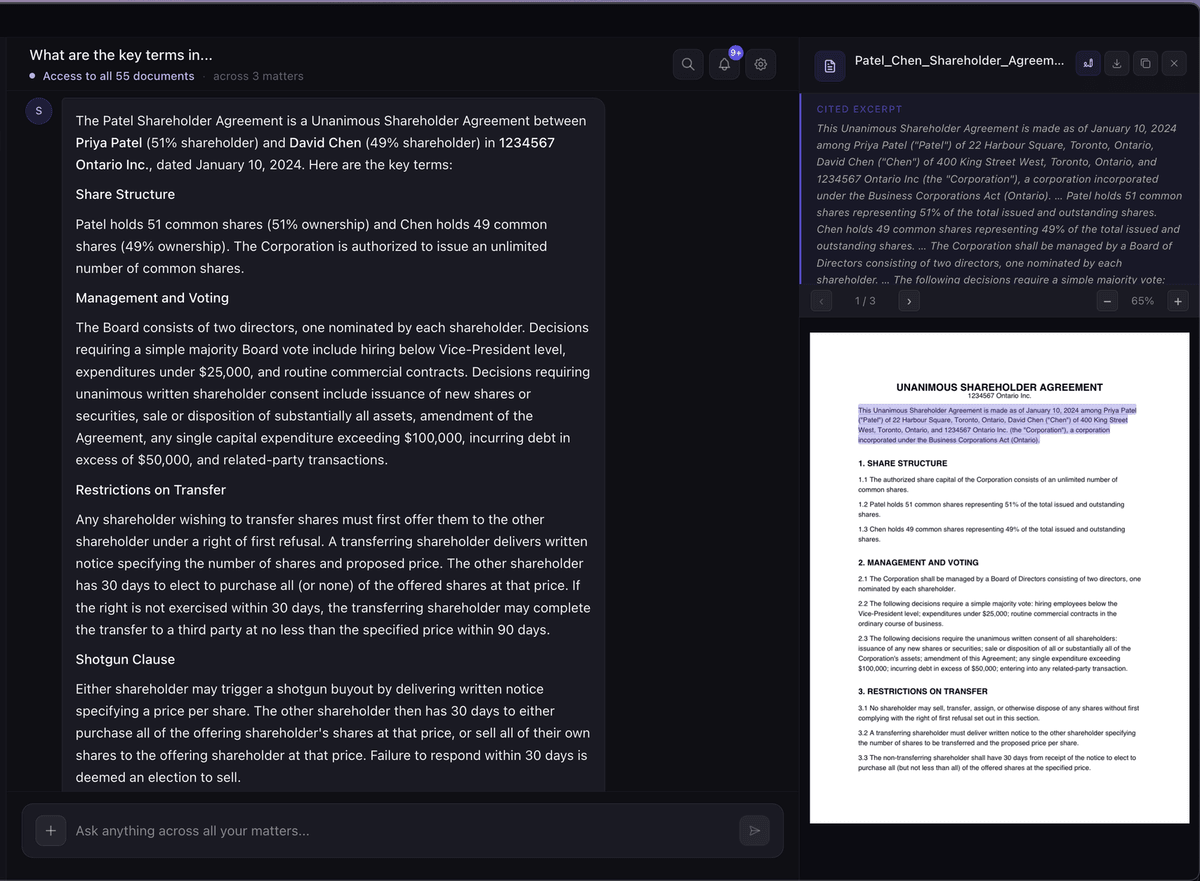
To be clear about the limits, because they matter: Surface answers from your own documents and email. It does not have access to CanLII, Westlaw, Lexis, or any external case-law database, so it is not a legal research tool. Its answers can still contain errors, which is why the citation and source panel exist. It is not legal advice and does not replace a lawyer's judgment.
If you are also weighing how AI fits your wider stack, see our guide to the best legal practice management software in 2026.
Why this matters
The competence duty is not just about knowing the law anymore. It includes understanding the tools you use and their failure modes, and AI's main failure mode is producing convincing errors.
The duty not to mislead the court is the sharp end of this. Lawyers in other jurisdictions have been sanctioned for filing submissions with case citations that an AI invented and no one checked. Verifying AI output against a real source is how you avoid that, and it is why a tool that shows its sources is safer than one that does not.
Confidentiality runs underneath all of it. Every choice about where your data is hosted, whether it is used for training, and who can compel access is a confidentiality choice, so treat vendor questions as client-protection questions.
This is general information, not legal advice - consult the LSO.
FAQ
Can Canadian lawyers use AI?
Yes. There is no rule against using AI in practice. The obligations are around how you use it: protect confidentiality, understand the tool's limits, and verify its output.
Is AI allowed under the LSO rules?
The LSO rules do not ban AI. They apply existing duties to it, mainly confidentiality under Rule 3.3-1 and competence under Rule 3.1-2, which includes understanding the technology and checking what it produces.
Can AI do legal research?
Not reliably on its own. General AI tools do not have dependable access to case law and can invent citations. Surface, for example, answers only from your own files and does not connect to CanLII, Westlaw, or Lexis, so treat legal research as a task that still needs proper sources and your review.
Is it safe to use AI with client files?
It can be, if the tool hosts your data in Canada, does not train on your inputs, offers a data processing agreement, and lets you verify answers against the source. A free consumer chatbot that may train on what you paste is a different risk profile. See our piece on whether ChatGPT is safe for lawyers.
Will AI replace lawyers?
No. AI can speed up document work and organization, but it does not exercise judgment, own the client relationship, or take responsibility for the file. It is a tool that a lawyer directs and checks, not a replacement for one.
Get Surface
Surface gives you an AI assistant over your own files and email, with verifiable citations and Canadian hosting, for $99/month CAD flat with everything included. There is a 14-day free trial and no credit card required.
Download Surface and try it on a real matter this week.
Related posts
Is ChatGPT Safe for Lawyers? What Ontario Practitioners Need to Know
Is ChatGPT safe for lawyers? What Ontario practitioners need to know about confidentiality, the LSO rules, the US CLOUD Act, and a compliant alternative.
Read →Best Legal Practice Management Software for Solo Lawyers (2026)
An honest 2026 roundup of legal practice management software for solo lawyers - Clio, MyCase, PracticePanther, CosmoLex, and Surface - compared on price and hosting.
Read →